Stop Processing Invoices Manually.
The AP Agent extracts invoice data, codes it against your rules, routes approvals, and posts to your ERP — with your team validating only where it matters.
This Isn't an Off-the-Shelf Tool
What you see below is a representation of what's possible. Every AP Agent is built from scratch around how your team actually works.
How the AP Agent Works
From invoice received to bill posted, the AP Agent executes every step. Coding, approvals, posting, and logging — all automated against your rules.

Connects to Your Systems
Connect your inbox, ERP, and communication tools. The AP Agent collects invoices from email, applies coding rules, routes approvals via Slack or email, and posts directly to your ERP. No file uploads. No manual handoffs.
Your Coding Rules, Applied Every Time
Tax treatment, GL codes, line item handling, currency defaults, memo formatting — captured in plain English and applied consistently to every invoice. No more tribal knowledge. No more inconsistent coding across the team.
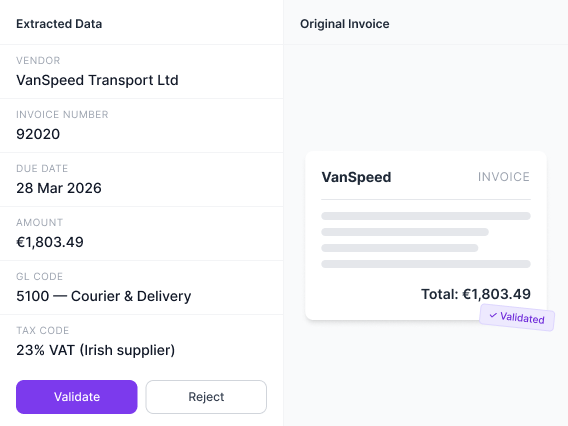
Review Before Anything Posts
You decide what requires review and what posts automatically. Set approval thresholds, auto-post rules, and exception triggers.
Invoices that meet your criteria move straight through. Anything outside those rules routes to validation or approval.
Reviews can happen inside the platform, in Slack, or via email. Approvers see the invoice, the extracted data, and the coding applied. One click approves or rejects. Nothing posts unless it meets the controls you've defined.
Approvals That Actually Move
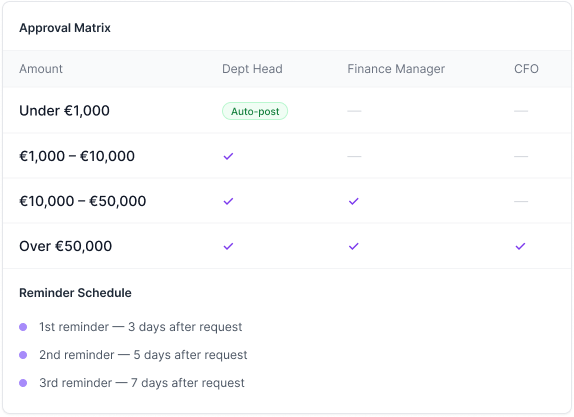
Define your approval matrix exactly how you want it. Route by amount, department, vendor, entity, project code, or any invoice attribute. Single-step or multi-layered. Sequential or parallel. Automatic below defined thresholds.
Approvers can respond in the platform, over email, or via Slack — whatever works for them. No logins required, no context switching.
The agent sends reminders automatically based on your schedule so approvals do not stall and your team does not chase.
Full Visibility. Full Audit Trail.
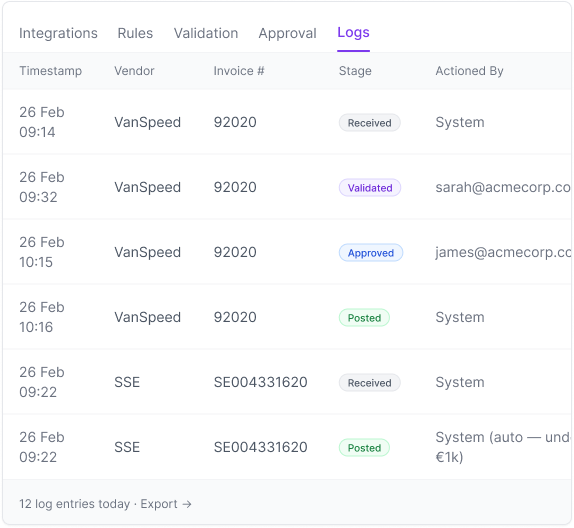
Every decision explained. Every action logged.
See Why Every Decision Was Made
For every field the agent fills in, you can open the reasoning panel and see which rule was applied, what data was used, and how the conclusion was reached. If something looks off, the full trail is there.
Full Audit Trail, Every Invoice
Every stage an invoice passes through is logged with a timestamp and the person or system that actioned it. Received, validated, approved, posted, rejected — all searchable, filterable, and exportable. Built for month-end reviews. Built for audits.
See How Numra Can Automate Your Accounts Payable.
Book a call and we'll show you the agent processing real invoices.
See a Demo