Accounts Receivable

Invoice and Collect. Automatically.

Numra's AR Agent reads signed contracts, drafts invoices for review, sends them to clients, and manages collections automatically so your team focuses on exceptions, not follow-ups.

AR Agent — Invoice Drafts 3 ready for review
Last synced with CRM 4 min ago
Meridian Consulting €15,000
INV-2026-0038 · EUR Overdue
Atlas Digital GmbH €8,500
INV-2026-0041 · EUR Draft
Birch & Partners LLP £6,200
INV-2026-0040 · GBP Sent
Northpoint Capital €12,600
INV-2026-0035 · EUR Paid
7 invoices · 3 ready for review View all invoices →

This Isn't an Off-the-Shelf Tool

What you see below is a representation of what's possible. Every AR Agent is built from scratch around how your billing process actually works.

What We Customise Fully Tailored
Data Connections
Your CRM, email, ERP, and billing portals. We connect to your stack.
Contract Reading
Any format, any layout. The agent reads the contract and extracts billing details the way your team would.
Invoice Rules
Payment terms, tax treatment, line items, PO references, currency — your billing logic, in plain English.
Collections Sequences
Your reminder schedule, tone, and escalation paths. Friendly to firm, on your timeline.
Trigger Logic
On signing, on completion, by milestone, monthly in arrears. Invoices send when the conditions you define are met.
Controls & Exceptions
Client replies pause the sequence. Edge cases get flagged. Your team stays in control of every exception.

How the AR Agent Works

From contract signed to payment received, every step is visible and every decision is explained.
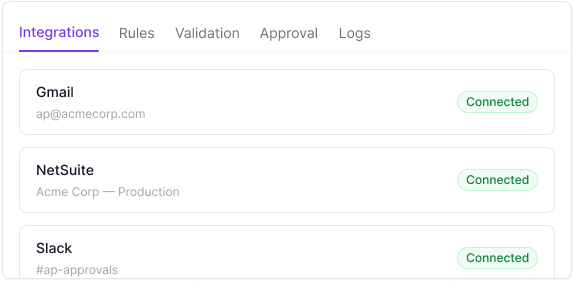
Integrations
Rules
Drafts
Sent
Logs
HubSpot
Acme Corp — Production
Connected
Gmail
billing@acmecorp.com
Connected
Xero
Acme Corp — Production
Connected
3 integrations active · Last synced 4 min ago

Connects to Your Systems

Connect your CRM, email, and accounting system. The AR Agent monitors for signed contracts, sends invoices from your billing inbox, and records activity in your ERP. No spreadsheets. No manual data entry.

Your Billing Rules, Applied Every Time

When to create an invoice, how to read the contract, what payment terms to apply, when to send reminders — captured in plain English and followed consistently. No missed invoices. No inconsistent billing. No tribal knowledge.
AR Agent/Rules/Invoice Creation
1
When a deal in the CRM is marked as Closed Won, read the attached contract and create draft invoices.
2
Use the full legal entity name from the contract, not a trading name or abbreviation.
3
Pull line items directly from the contract. Each deliverable or fee should be its own line item with description, quantity, unit price, and total.
4
If the contract has multiple payment milestones, create a separate draft invoice for each milestone. Hold each one until the relevant milestone is marked complete.
5
Apply payment terms from the contract. If none are specified, default to Net 30 from the invoice date.
6
If a purchase order number is referenced anywhere in the contract, include it on the invoice.
6 of 12 invoice creation rules shown · View all →
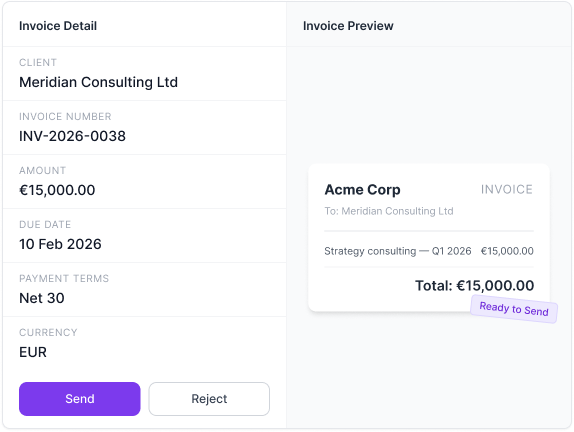
Invoice Detail
Client
Meridian Consulting Ltd
Invoice Number
INV-2026-0038
Amount
€15,000.00
Due Date
10 Feb 2026
Payment Terms
Net 30
Currency
EUR
Invoice Preview
Acme Corp INVOICE
To: Meridian Consulting Ltd
Strategy consulting — Q1 2026 €15,000.00
Total: €15,000.00
Ready to Send

Review Before Anything Sends

Every invoice the agent drafts lands in a review queue. Your team sees the invoice details alongside a preview of the actual document that will be sent to the client.

The source contract is on the same screen so you can cross-reference without switching tabs. Fields are editable. When it looks right, one click sends it.

Collections That Run Themselves

Define your reminder schedule and the agent handles the rest. Friendly reminders before the due date. Progressively firmer follow-ups after. Every email is personalised with the invoice number, amount, and client name.

If a client replies like "paying Friday" or "query on line 3", the agent pauses the sequence and flags the reply for your team. No double-reminders. No manual tracking.

Meridian Consulting
INV-2026-0038 · €15,000
Invoice sent
12 Jan 2026
Friendly reminder sent
5 Feb
Due today reminder sent
10 Feb
First follow-up sent
13 Feb
Client replied: 'Will pay by Friday'
14 Feb
Next: Second follow-up (paused)
17 Feb
5 days overdue · Reminder sequence paused

Full Visibility. Full Audit Trail.

Every decision explained. Every action logged.

See Why Every Decision Was Made

For every field the agent fills in on the invoice, you can open the reasoning panel and see where the value came from in the contract. Client name, payment terms, line items, tax treatment. Every choice is explained.

Agent Reasoning — INV-2026-0038 Explain
Client: Meridian Consulting Ltd
Contract header lists 'Meridian Consulting Ltd' as the registered company name. A trading name 'Meridian' also appears but the rule requires the full legal entity name. Used: Meridian Consulting Ltd.
Amount: €15,000.00
Section 4 of the contract states a fixed project fee of €15,000 for strategy consulting services. No VAT clause specified — applied standard domestic rate. Single line item created.
Payment Terms: Net 30
Section 7 states 'Payment is due within 30 days of invoice date.' Applied: Net 30. Invoice date 10 Jan 2026, due date calculated as 10 Feb 2026.

Full Audit Trail, Every Invoice

Every stage an invoice passes through is logged — when the draft was created, who reviewed it, when it was sent, which reminders went out, when the client replied, and when payment was received. Searchable, filterable, and exportable.

Integrations
Rules
Drafts
Sent
Logs
Timestamp Client Invoice # Stage Actioned By
10 Jan 09:15 Meridian Consulting INV-2026-0038 Draft Created System
10 Jan 11:42 Meridian Consulting INV-2026-0038 Validated sarah@acmecorp.com
10 Jan 11:43 Meridian Consulting INV-2026-0038 Sent System
5 Feb 09:00 Meridian Consulting INV-2026-0038 Reminder Sent System
14 Feb 14:22 Meridian Consulting INV-2026-0038 Client Replied System
21 Feb 10:15 Meridian Consulting INV-2026-0038 Payment Received System
18 log entries today · Export →

See How Numra Can Automate Your Accounts Receivable.

Book a call and we'll show you the agent reading contracts and managing collections.

Book a Demo →