Finance Inbox

Stop Triaging Emails Manually.

Numra's Inbox Agent reads every email, applies your rules, and takes action. Label, forward, reply, or route to processing automatically.

Inbox Agent — Processed Emails Active
16 processed today · 0 errors
Orders at Amazon
Purchase Order #PO-29481
Purchase Order Labelled, proceeded to processing
IKEA
RE: Invoice #4421 — will pay Friday
Promise to Pay Labelled, reply sent
Pfizer
Dispute — Invoice INV-2026-0019
Dispute Forwarded to billing, reply sent
DHL
Invoice DUBIR00325806
Missing PO Reply sent — PO required
7 emails shown · 16 processed today View full log →

What Your Team Is Doing Today

Manual inbox triage, classification, validation, and routing — repeated dozens of times a day.

Your finance inbox fills with invoices, statements, queries, disputes, remittance advice, and vendor requests.

Someone opens each email, decides what it is, checks the details, and takes action. It is not complex. It is repetitive. And it consumes hours.

The Manual Process
1
Open the email and read it
2
Decide what type of email it is — invoice, statement, query, dispute, remittance?
3
Check if the invoice has a PO number, if the vendor is in the system, if the amounts add up
4
Label or file it in the right folder
5
Forward it to the right person or reply to the sender
6
Repeat 50–200 times per day
3–5 minper email 50–200emails per day 25+ hrsper month wasted

That time shifts from inbox triage to real finance work.

How the Inbox Agent Works

Clear rules. Automated actions. Full visibility.

Search mail
Inbox 16
PO
Orders at Amazon
Purchase Order — PO#AMZ-10477 — Hi Numra Sales Team, Please process the attached...
RFQ
Tesla Purchasing
Request for Quote — Battery Monitoring Modules — Hello, We're looking for a quote on...
No PO
Scottish Power
SSE Invoices & Credit Note — Issued 26 June 2025 — Dear Customer, Please find your...
Promise
IKEA
Re: Payment reminder — invoices NUM-1412 & NUM-1415 — Hi, Thanks for the reminder...
Dispute
Pfizer
Re: Invoice NUM-1359 — request for payment — Hi David, We've checked it against our...
Setup
Logitech
Vendor registration request — Hello, We've recently started supplying IT peripherals...
Reminder
Accounts
Reminder — Invoice #CC-11894 overdue — Dear Numra Accounts Payable, This is a friendly...

Works Inside Your Inbox

The agent reads every email that hits your shared inbox — invoices, POs, statements, queries, disputes, remittance advice. Each one is classified instantly and labelled right inside your mailbox. Your team opens Gmail or Outlook and sees everything already sorted, flagged, and handled.

Your Rules, In Plain English

Every rule is written clearly and reflects how your team already works. If the email contains an invoice without a PO number, reply explaining your no-PO-no-pay policy and ask them to reissue. If it's a remittance advice, label it and confirm receipt. You write the logic. The agent follows it, every single time.
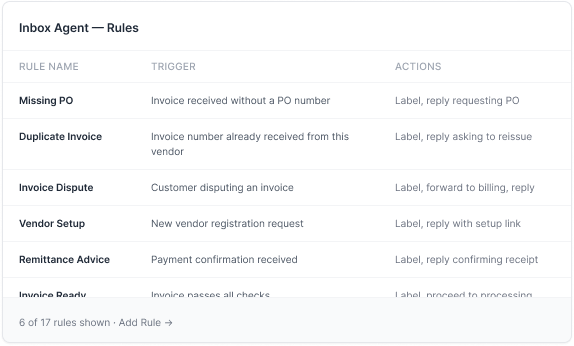
Inbox Agent — Rules
Rule Name Trigger Actions
Missing PO Invoice received without a PO number Label, reply requesting PO
Duplicate Invoice Invoice number already received from this vendor Label, reply asking to reissue
Invoice Dispute Customer disputing an invoice Label, forward to billing, reply
Vendor Setup New vendor registration request Label, reply with setup link
Remittance Advice Payment confirmation received Label, reply confirming receipt
Invoice Ready Invoice passes all checks Label, proceed to processing
6 of 17 rules shown · Add Rule →
Log Detail — Kreditorenf. Invoice
Email Summary
From Kreditorenf.
Subject Rechnung Nr. 847-2026
Attachment rechnung_847.pdf
Classification
Matched Rule:Missing PO

Email contains an invoice from Kreditorenf. Invoice total is €847.20. No PO number found on the invoice or in the email body. Matched rule: Missing PO.

Actions Taken
Labelled as 'Missing PO'
Reply sent in German — PO required, please reissue
Processed in 1.2s · Language: German

See Exactly What Happened

Every email the agent processes gets a full log entry. Which rule matched, why it matched, and what actions were taken. If the email was in German, you'll see that the agent processed it correctly and replied in German. Nothing is hidden.

Connects in Minutes

One OAuth connection to your shared inbox. No passwords stored. No infrastructure changes. The agent starts monitoring immediately and processes each email in seconds.

Integrations 1 connected
Gmail
ap@acmecorp.com
Connected
Outlook
finance@acmecorp.com

The Inbox Agent connects to your shared mailbox via OAuth. No passwords stored. Supports Gmail and Outlook. Monitoring starts immediately after connection.

Connected via OAuth · Read-only access

See How Numra Can Automate Your Inbox.

Book a call and we'll show you the agent running on a real inbox.

Book a Demo →