Purchase requisition: what it is, how it works, with a free form
A purchase requisition is an internal request to buy something. A member of staff says what they need, from which supplier, for how much and why. The right people approve it. Only then does the business raise a purchase order and send it to the supplier. The requisition controls spend before it happens, which is why most finance teams want one for anything above a small amount.
Download the free purchase requisition form (Excel)
Running requests by email and spreadsheet? Numra lets anyone raise a purchase request without a Xero login, routes it by your approval rules and budgets, and creates the approved purchase order in Xero. See how it works.
Purchase requisition vs purchase order
The two documents sit either side of the approval. The requisition asks for permission. The purchase order acts on it.
| Purchase requisition | Purchase order | |
|---|---|---|
| Who sees it | Your own staff only | Your staff and the supplier |
| Raised by | The person who needs the goods or service | Finance or the buyer |
| When | Before approval | After approval |
| What it does | Asks for permission to spend | Confirms the order with the supplier |
| Commits the business | No | Yes, once the supplier accepts it |
| Where it lives | A form, an email or a purchasing system | Your accounting system |
In a small team the two are often one record: the requester fills in a draft purchase order, and approval turns it into the order that goes to the supplier.
The purchase requisition process
- Raise the request. The requester says what they need, the supplier, quantities and prices, the cost centre and when it is needed. They attach the quote.
- Check the budget. Finance or the system compares the amount with what is left on the budget for that account and cost centre, after spend to date and open purchase orders.
- Approve. The request goes to the approver the amount needs. A request over budget or above a limit goes to a second approver.
- Raise the purchase order. Once approved, the purchase order is created in the accounting system with the agreed supplier, amounts and coding, and sent to the supplier.
- Record what arrives. When the goods or service arrive, someone records it against the purchase order.
- Match the invoice. The supplier invoice is checked against the purchase order and what arrived before it is paid.
What goes on a purchase requisition form
- Request: requisition number, date, requester, department, project or cost centre, and the date needed.
- Supplier: suggested supplier, their email and the quote reference.
- Items: each item or service with quantity, unit price, VAT rate and account code.
- Reason: one line on why the purchase is needed.
- Budget: what is left on the account before and after the request.
- Approval: who must approve, their decision and the date.
- Finance use: the purchase order number once it is raised.
The free purchase requisition form
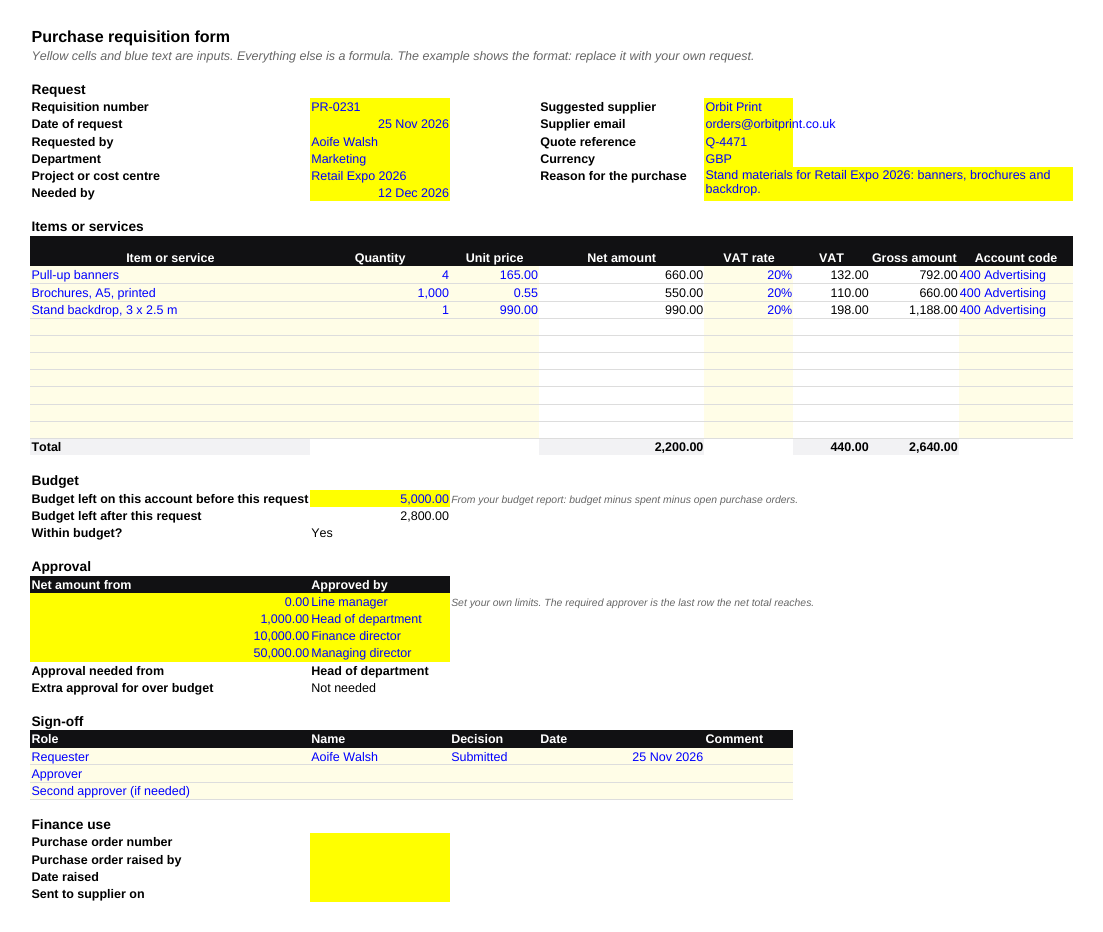
The Excel form has the requisition sheet and a short instructions sheet. It works in Excel and Google Sheets.
- Inputs in yellow and blue text. Everything else is a formula.
- Line totals: net, VAT and gross for each item and for the request.
- Budget check: enter what is left on the account and the form shows whether the request fits.
- Approval limits: set your limits once. The form names the approver the net total needs and asks for an extra approval when the request is over budget.
- Sign-off and finance use: each approver’s decision and date, then the purchase order number.
Setting approval limits
Approval limits say who can approve how much. A simple set for a business with a few departments:
| Net amount | Approved by |
|---|---|
| Up to £1,000 | Line manager |
| £1,000 to £10,000 | Head of department |
| £10,000 to £50,000 | Finance director |
| £50,000 and above | Managing director |
Add a rule for requests over budget: they go to the finance director whatever the amount. Keep the limits in one place, so requesters and approvers see the same list.
Purchase requisitions in Xero
Xero has no requisition record. Its purchase orders have four statuses: Draft, Awaiting approval, Approved and Billed. Most Xero teams use a draft purchase order as the request: the requester creates it, submits it for approval, and a user with approve permission approves it.
That works when a few people buy. It gets harder as more staff need to request:
- Every requester needs a Xero login. Xero’s Draft sales and purchases role lets a user create drafts and see only their own. The other roles that can raise purchase orders can also approve them, and Xero users have asked for a role that can create a purchase order without approving it.
- Purchase order access comes with bills. Users have asked for a purchase orders only role, so staff can raise orders without seeing supplier bills. Xero has said separate purchase order permissions and a Purchase Orders only role are coming, with no date yet.
- One approval step. There are no limits by amount, department or budget. Whoever holds approve permission approves.
- No budget check at the point of approval. Budgets are a report, not part of the purchase order.
Doing it automatically
Numra Purchase Orders runs the requisition process for Xero and other accounting systems.
Anyone can raise a request. Staff raise purchase requests in Numra or from Claude or ChatGPT, with no Xero login. They choose the supplier, add items, pick the department and project, and attach the quote. Numra proposes the account code from the supplier’s past purchase orders and bills.
Approvals follow your rules. Numra routes each request by amount, supplier, department, account or requester. Approvers decide from email or Slack, with reminders and delegates. Each request shows the budget, what has been spent, what is committed on open purchase orders and what is left. A request over budget can go to an extra approver.
The purchase order goes to Xero. After the final approval, Numra creates the purchase order in Xero with the agreed supplier, amounts and coding, and sends it to the supplier from your mailbox. Staff record what arrived, and Numra Accounts Payable matches the supplier invoice to the order and the delivery.
To compare the options for Xero, see the best purchase order software for Xero.
Sources
- CIPS: Purchase requisition (definition), checked 25 November 2026
- Xero Product Ideas: purchase orders have four statuses (Draft, Awaiting Approval, Approved, Billed), checked 25 November 2026
- Xero blog: user permissions (new roles, purchase order permissions coming), checked 25 November 2026
- Xero Product Ideas: Purchase Orders only user role, checked 25 November 2026
- Xero Product Ideas: draft purchases without approve permission, checked 25 November 2026