Supplier statement reconciliation in Xero, with a free template
To reconcile a supplier statement in Xero, run the Aged Payables Detail report as at the statement date, filter it to the supplier, and compare each open bill and credit note with the open items on the statement. Every difference is either an item on one side only or an amount entered differently. Xero has no supplier statement feature, so most teams do the comparison in a spreadsheet. The free template on this page does it for you: paste both lists in and it pairs the references, works out the difference and shows what is left to explain.
Download the supplier statement reconciliation template (Excel)
Reconciling statements for dozens of suppliers every month? Numra does it automatically for Xero: it requests each statement, reads every line and shows each difference, with no spreadsheet. See how it works.
What supplier statement reconciliation is
A supplier statement lists what the supplier thinks you owe at a date. Your purchase ledger in Xero says what you think you owe. Reconciling the two finds invoices you never received, credit notes you have not entered, bills posted twice or to the wrong supplier, and payments the supplier has not yet applied. It is the check that stops you paying an invoice twice or missing one until the supplier puts you on stop.
How to reconcile a supplier statement in Xero
- Note the statement date and closing balance. Use the open items on the statement. If the statement shows every transaction in the month, take the balance brought forward plus the open invoices and credit notes.
- Run Aged Payables Detail in Xero. Go to Reports, then Aged Payables Detail. Set the date to the statement date, filter the report to the supplier, and set the invoice date filter to bills raised up to the statement date. This shows what was open at that date, with payments up to that date taken off.
- Compare the balances. The difference is statement balance minus Xero balance. If it is zero, the statement agrees. If not, go line by line.
- Pair the lines by reference. Tick off each invoice and credit note that appears on both lists for the same amount. The template does this with the reference number.
- Explain what is left. Each unpaired line or amount difference has a cause. The table below lists the common ones and what to do.
- Fix and record. Ask the supplier for copies of missing invoices, enter missing credit notes, correct amounts, and note timing differences such as a payment made on the last day of the month. Keep the reconciliation with the statement for your month-end file.
The free template
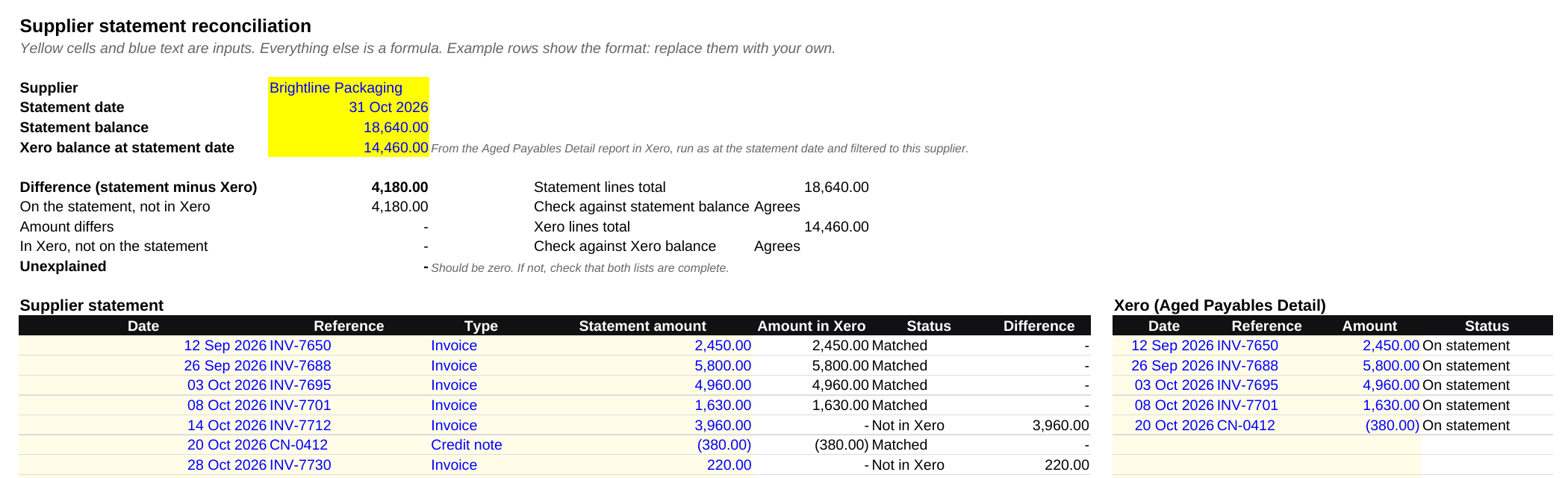
The Excel template has one reconciliation sheet and a short instructions sheet. It works in Excel and Google Sheets.
- Inputs: supplier, statement date, statement balance and Xero balance, in yellow.
- Two lists: the open items from the statement, and the open items from Aged Payables Detail.
- Automatic pairing: each statement line shows Matched, Not in Xero or Amount differs, and each Xero line shows whether it is on the statement.
- Summary: the difference, split into items not in Xero, amount differences and items not on the statement, with what is still unexplained. It also checks that each list adds up to its balance.
Worked example
Brightline Packaging’s statement at 31 October shows £18,640.00. Aged Payables Detail in Xero at the same date shows £14,460.00, so the difference is £4,180.00.
| Reference | Statement | Xero | Status |
|---|---|---|---|
| INV-7650 | £2,450.00 | £2,450.00 | Matched |
| INV-7688 | £5,800.00 | £5,800.00 | Matched |
| INV-7695 | £4,960.00 | £4,960.00 | Matched |
| INV-7701 | £1,630.00 | £1,630.00 | Matched |
| INV-7712 | £3,960.00 | – | Not in Xero |
| CN-0412 | -£380.00 | -£380.00 | Matched |
| INV-7730 | £220.00 | – | Not in Xero |
| Total | £18,640.00 | £14,460.00 | Difference £4,180.00 |
Two invoices, INV-7712 for £3,960.00 and INV-7730 for £220.00, are on the statement and not in Xero. Together they make up the whole £4,180.00, so nothing is left unexplained. The next step is to ask Brightline for copies and check whether the goods arrived.
Why a supplier statement does not match
| Reason | How it shows | What to do |
|---|---|---|
| Invoice never received | On the statement, not in Xero | Ask the supplier for a copy, check the goods arrived, then enter it |
| Credit note not entered | On the statement, not in Xero, negative | Ask for the credit note and enter it |
| Payment in transit | In Xero as paid, still open on the statement | Timing difference: note it and check next month |
| Bill posted to the wrong supplier | In Xero under another supplier, missing here | Move the bill to the right supplier |
| Duplicate bill in Xero | In Xero twice, on the statement once | Void the duplicate before it is paid |
| Amount entered differently | On both, amounts differ | Compare the two documents and correct the one that is wrong |
| Payment applied to a different invoice | Amounts move between invoices | Agree with the supplier which invoices the payment covers |
How often to reconcile
Reconcile your main suppliers every month, once the month-end bills are in. Reconcile smaller suppliers at least each quarter and before your year end, and any supplier that sends a reminder or puts your account on hold.
Doing it automatically
The spreadsheet works for a handful of suppliers. It gets slow when you have dozens of statements a month, and harder still when they arrive as PDFs in different layouts.
Numra does the whole process for Xero, for every supplier, every month.
- Collects the statements. Numra asks each supplier for a statement from your mailbox and chases the ones that do not arrive.
- Reads every line. PDFs in any layout, by email or upload.
- Reconciles against Xero. Every line is compared with your Xero ledger at the statement date. Each supplier shows as Matched, Discrepancy or No statement.
- Explains each difference. Missing invoices, missing credit notes and amount differences are listed line by line.
- Gets the missing documents. Numra drafts the email asking the supplier for them, ready for you to send.


You can also check statements and chase suppliers from Claude, ChatGPT or Gemini. Supplier Statement Reconciliation is from £45 a month.
Comparing tools? See the best supplier statement reconciliation software.
Sources
- Xero Product Ideas: run aged reports as at one date (Xero's reply with the filter steps), checked 25 November 2026
- Xero Product Ideas: ageing and contact filters on the Aged Payables Detail report, checked 25 November 2026
- Xero Product Ideas: feature to save supplier statements, checked 25 November 2026
- Xero Community: grouping the Aged Payables Detail report by contact, checked 25 November 2026